
Need a survey quote? Start in AutoCAD.
The quickest way to request a survey is from inside the plugin. Draw your boundary, choose the survey, add your project details and submit.
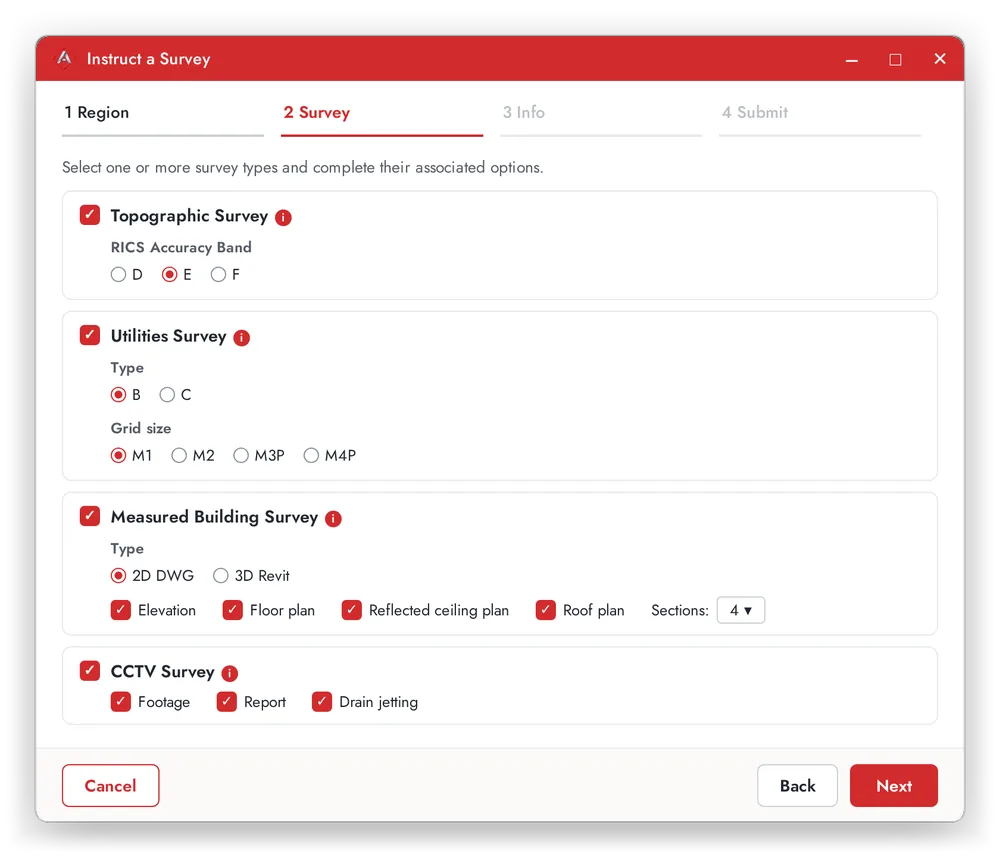
Choose the survey you need.
Set survey types take the guesswork out of what to ask for, so nothing gets missed.
Topographic
A measured record of the land and what is on it.
Utilities (PAS 128)
Locate and map buried services on site.
Measured building
Accurate measured plans of existing buildings.
CCTV
Camera surveys of drainage and pipework.
From boundary to quote in four steps.
Draw your boundary
On the map view, or from a closed polyline in your drawing.
Pick the survey
Topographic, utilities, measured building or CCTV.
Add project details
Anything relevant about the project and the site.
Submit
Adaptive Surveys reviews it and gets in touch to talk through the details.
Not in AutoCAD?
You can still ask for a quote. Use the survey instruction form on the Adaptive Surveys website.
About Adaptive Surveys
Land and measured building survey specialists, with offices in Aberdeen (Westhill) and Coatbridge. AdaptiveSDS is a service from the same team.
Quote within 48 hoursStart your request in AutoCAD.
Download AdaptiveSDS, draw the site boundary, and send it to Adaptive Surveys in a few clicks.